
.png)
Description
Download AI Prompt Art Maker Generator – AI‑Powered Creative Tool for iPhone, iPad & iPod touch
Overview
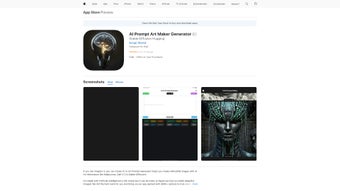
AI Prompt Art Maker Generator is a sleek, browser‑based web‑app that brings the power of artificial‑intelligence directly to the fingertips of mobile creators. Designed with a touch‑first philosophy, the tool works flawlessly on iPhone, iPad, and iPod touch, allowing artists to generate fresh, text‑based prompts with a single tap. The underlying AI models have been trained on millions of artwork descriptions, ensuring that each prompt is not only unique but also relevant to the style, mood, and color palette you select. Whether you enjoy sketching in Procreate, painting in Adobe Fresco, or simply doodling with a stylus on your iPad, the prompts act as a catalyst, turning moments of creative block into bursts of inspiration. Because the application runs entirely in the browser, there is no need for a traditional installer, no large file to download, and updates are applied automatically without user intervention. Security is baked into the architecture: all data transfers use HTTPS, and personal information is never stored unless you explicitly enable iCloud sync. In short, AI Prompt Art Maker Generator transforms idle minutes on the commute, coffee break, or waiting room into productive sketch sessions, making it an indispensable companion for hobbyists, professional illustrators, educators, and anyone who loves visual storytelling.
Key Features
- AI‑Generated Prompts: Real‑time creation of tailored art prompts based on your chosen genre, mood, and color palette, delivering concise sentences or short paragraphs that spark imagination.
- Touch‑Optimized UI: Large, tappable buttons, intuitive swipe gestures, and a dark‑mode theme designed specifically for iOS touch devices, ensuring a comfortable experience even during long sessions.
- Extensive Style Library: Over 30 built‑in artistic styles ranging from classic oil painting and watercolor to futuristic cyber‑punk, manga, abstract expressionism, and more.
- Save & Share Options: Export prompts as plain‑text, copy to clipboard, or share instantly via the iOS share sheet to Messages, Mail, Instagram, or directly into drawing apps like Procreate and Clip Studio Paint.
- Offline Cache: The five most recent prompts are stored locally on the device, allowing you to retrieve them without an internet connection.
- Secure Cloud Sync: Optional iCloud synchronization keeps your favorite prompts synchronized across all Apple devices, with end‑to‑end encryption for added privacy.
- Regular Updates & New Styles: The development team releases monthly updates that introduce fresh artistic styles, AI model improvements, and UI refinements.
- Zero‑Cost Core Functionality: Unlimited prompt generation and basic style selection are completely free; a modest subscription unlocks advanced iCloud sync and premium style packs.
- Multilingual Support: Prompts can be generated in English, Spanish, French, German, and Japanese, broadening accessibility for creators worldwide.
Installation, Compatibility & How to Use
Getting Started – No Download Required
Because AI Prompt Art Maker Generator is a progressive web app, there is no traditional installer or app‑store download. Simply launch Safari (or any modern browser) on your iPhone, iPad, or iPod touch and navigate to aipromptartmaker.example.com. For an app‑like experience, tap the Share icon at the bottom of Safari and select “Add to Home Screen.” This creates a dedicated icon that opens the generator in full‑screen mode, mimicking a native application while retaining the flexibility of a web service.
Step‑by‑Step Workflow
- Select a Style: Browse the style library or click “Surprise Me” to let the AI suggest a random genre that matches your current mood.
- Set Preferences: Adjust sliders for mood (calm, energetic, mysterious), intensity of color, and level of detail. These parameters guide the AI in shaping the prompt.
- Generate Prompt: Press the “Create Prompt” button. Within 2–3 seconds, the AI delivers a concise, inspirational description such as “A neon‑lit cyber‑city skyline reflected in rain‑slick streets, viewed from a low angle.”
- Copy & Create: Tap the clipboard icon to copy the prompt, then open your preferred drawing app (Procreate, Adobe Fresco, SketchBook, etc.) and paste the prompt as a reference.
- Save for Later: Use the “Save Prompt” button to store the prompt in your personal history. Saved prompts appear in a scrollable list at the bottom of the screen, and you can tag them for easy retrieval.
- Share & Inspire Others: Share the prompt directly via iMessage, WhatsApp, or social media to collaborate with fellow artists or start a community challenge.
Compatibility Details
The web‑app is optimized for iOS 13 and later, covering iPhone, iPad, and iPod touch. It leverages modern web standards (HTML5, CSS3, WebGL, Service Workers) to ensure fast loading and offline caching. While the primary UI is fine‑tuned for Apple hardware, the site also works on recent Android browsers (Chrome, Edge, Firefox) with a functional but slightly simplified layout.
Pros & Cons – Quick Reference
Pros
- Instant, high‑quality prompts tailored to your artistic preferences.
- Zero download size; updates happen automatically in the background.
- Touch‑first design offers a fluid, on‑the‑go creative workflow.
- Free core functionality with optional premium iCloud sync.
- Secure, HTTPS‑encrypted communication protects user data.
- Offline cache allows access to recent prompts without internet.
- Multilingual support broadens the user base.
- Regular updates introduce new styles and AI improvements.
Cons
- Initial prompt generation requires an internet connection.
- Full UI polish is limited to iOS devices; Android users see a basic layout.
- Prompt customization is guided by sliders, offering less manual control for advanced artists.
- Advanced iCloud sync and premium style packs require a subscription.
- As a web‑app, performance may vary on older devices with limited processing power.
Conclusion: Boost Your Creative Flow with AI Prompt Art Maker Generator
AI Prompt Art Maker Generator bridges the gap between cutting‑edge technology and artistic imagination. By delivering instantly generated, context‑aware prompts, it eliminates the dreaded blank‑canvas syndrome and keeps your sketchbook populated with fresh ideas. The touch‑optimized interface, seamless iCloud sync, and secure browser‑based architecture make it a reliable companion for creators who move between iPhone, iPad, and desktop environments. Whether you are a student seeking daily drawing challenges, a professional illustrator hunting for new angles, or a hobbyist looking for a quick burst of inspiration during a commute, this tool offers a low‑friction, constantly evolving creative partner.
Ready to supercharge your art practice? Visit the AI Prompt Art Maker Generator website, add it to your Home Screen, and start generating prompts today. The best part? The core service is completely free, and you’ll benefit from automatic updates that keep the inspiration pipeline fresh. Don’t let a blank canvas hold you back—let AI Prompt Art Maker Generator be the spark that lights your next masterpiece.
Rating: 4.5 / 5
Pros: Instant, high‑quality prompts; zero‑download, automatic updates; intuitive touch UI; secure web architecture; offline cache.
Cons: Requires internet for new prompts; UI is most polished on iOS; limited manual prompt editing; premium features behind a subscription.
Frequently Asked Questions
-
Is AI Prompt Art Maker Generator really free?
Yes, the core functionality—including unlimited prompt generation and basic style selection—is completely free. An optional iCloud sync feature and premium style packs are available for a small subscription fee.
-
Do I need an Apple ID to use the app?
No. You can generate prompts without signing in. An Apple ID is only required if you want to enable iCloud synchronization for cross‑device backup.
-
Can I export prompts to other drawing apps?
Absolutely. Prompts can be copied to the clipboard, saved as a .txt file, or shared directly via the iOS share sheet to Procreate, Adobe Fresco, Clip Studio Paint, and many other creative applications.
-
What if I lose internet connection?
The last five generated prompts are cached locally, so you can still view and use them offline. New prompts, however, require an active internet connection.
-
Is my data safe when using the web‑app?
Yes. All communication is encrypted via HTTPS, and no personal data is stored unless you opt‑in to iCloud sync. The app complies with GDPR and Apple’s privacy standards.
Guides & Tutorials for AI Prompt Art Maker Generator
How to install AI Prompt Art Maker Generator
- Click the Preview / Download button above.
- Once redirected, accept the terms and click Install.
- Wait for the AI Prompt Art Maker Generator download to finish on your device.
How to use AI Prompt Art Maker Generator
This software is primarily used for its core features described above. Open the app after installation to explore its capabilities.
User Reviews for AI Prompt Art Maker Generator 0
No reviews found




